
What’s New - Mar 2026 Release
We’re excited to roll out a new update focused on speed, simplicity, and real job-site usability. Every change in this release is based directly on feedback from window treatment professionals who use the app daily.
This update brings four key improvements that make measuring faster, safer, and more intuitive—especially on large projects and high or hard-to-reach windows.
Let’s walk through what’s new.
Change 1:
Cleaner Measurement Form
We made a small but meaningful improvement to the Measurement Form layout to reduce clutter and improve focus while measuring.
What Changed?
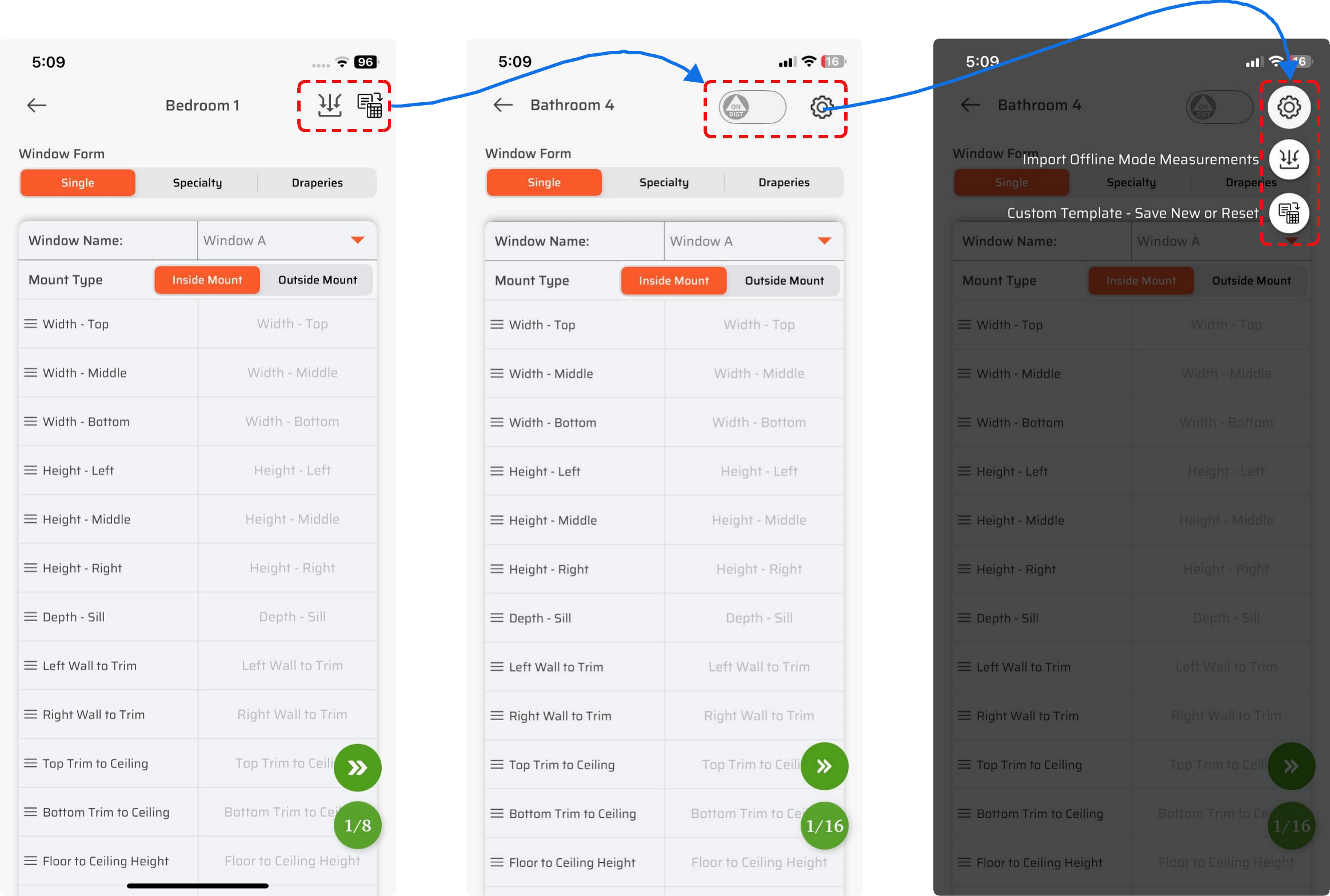
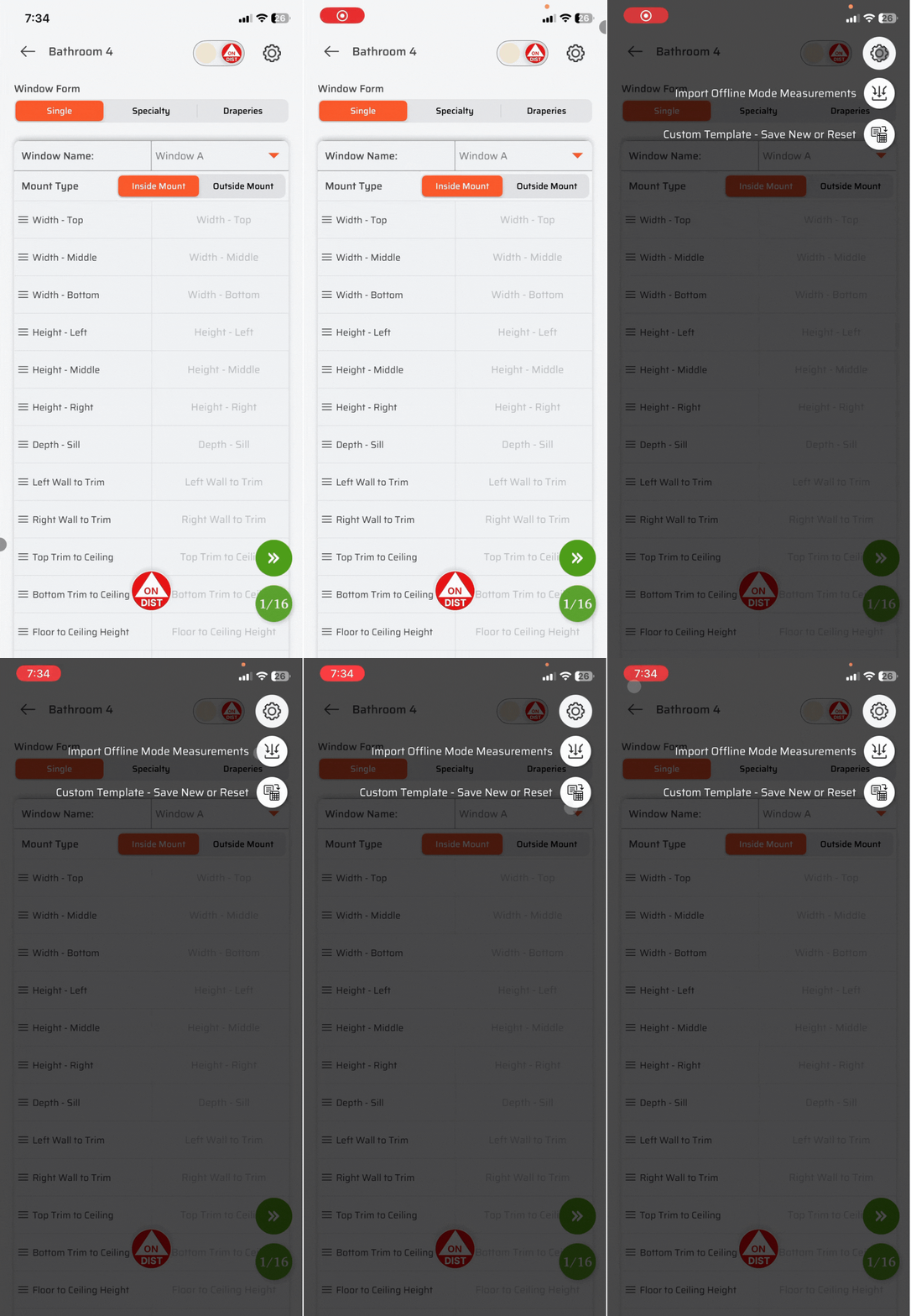
Previously, actions like Import Measurements and Save Template were displayed directly on the measurement screen. While useful, they added visual noise to an already information-dense page.
These actions are now grouped neatly under the Settings (⚙️) icon, helping keep the screen clean and focused.
By optimizing the available space, we were able to position the Disto Trigger switch so it’s easier to access without interrupting your workflow.
🎯 Change 2:
In-App Disto Trigger Button
This is one of the most requested features we’ve ever received—and it’s finally here.
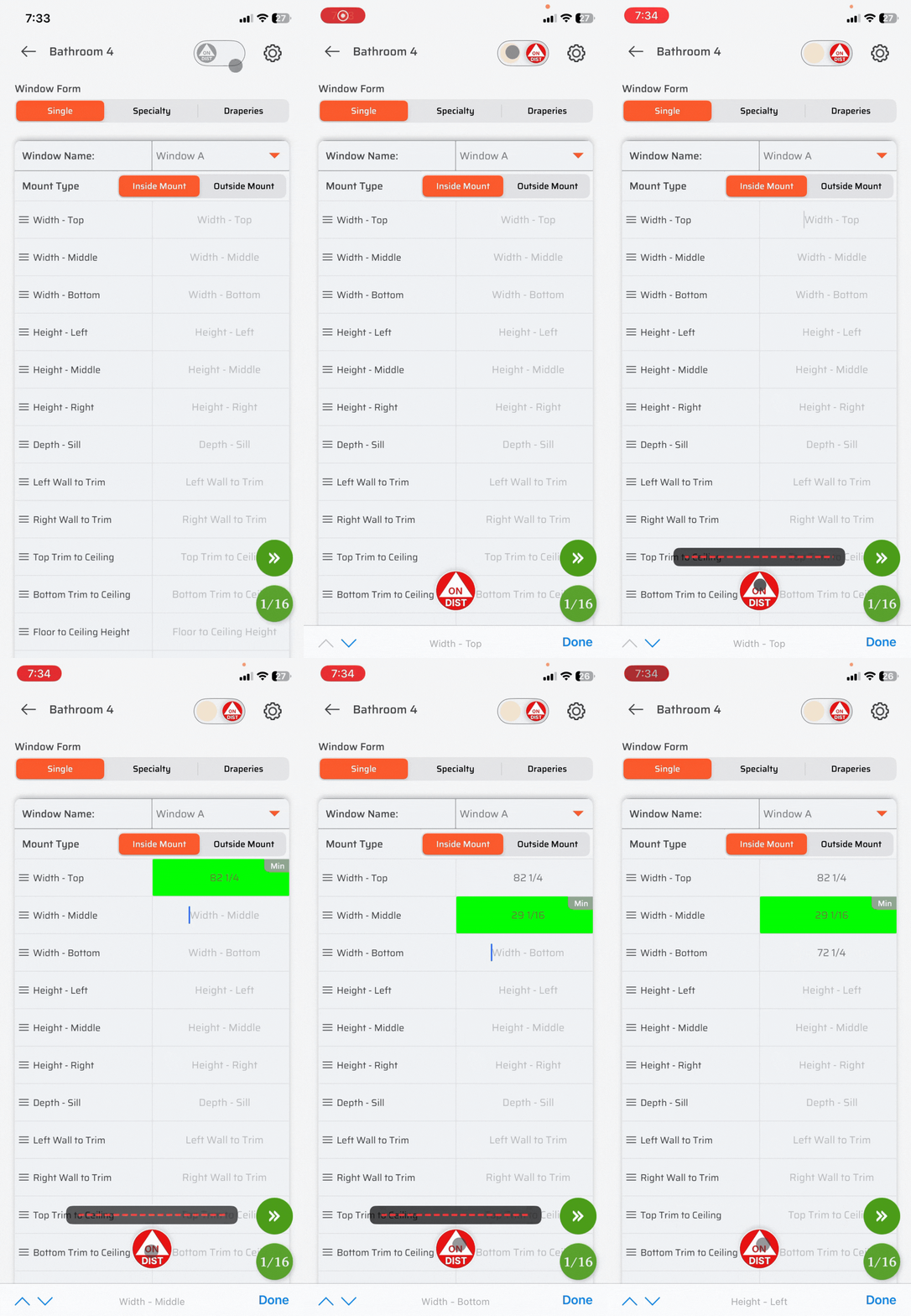
Trigger Measurements Directly from the App
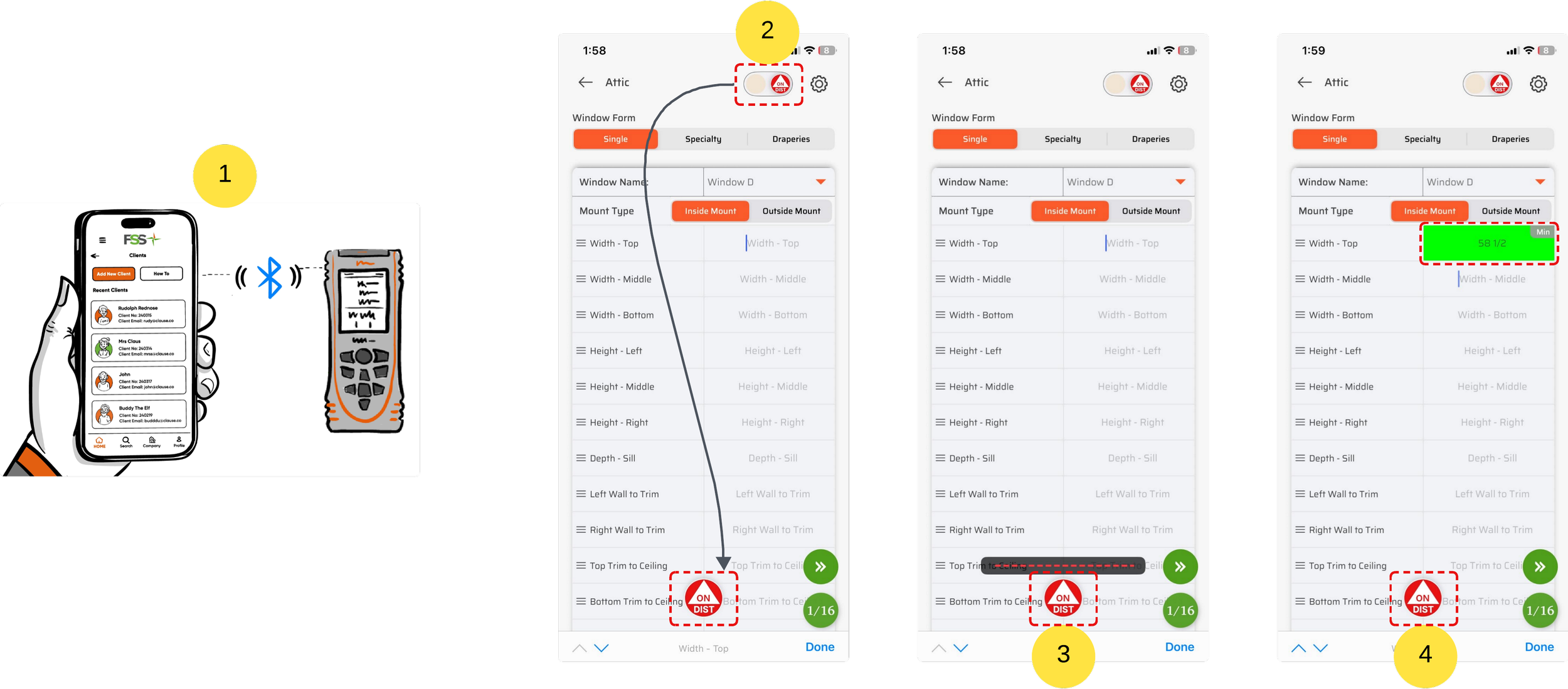
You can now use the trigger button inside the app to fire the Disto laser and capture measurements—without pressing the physical button on the device.
What’s New?
Tap the ON Disto trigger button directly in the app
Instantly trigger the laser from your phone
Measurements are captured and filled automatically into the active field
Haptic feedback and the Disto beep confirm the measurement, so there’s no need to look at the device every time
Disto beep volume can be controlled using your phone’s volume buttons, giving you full control based on your environment
Why This Matters
With tactile and audible feedback, you can stay focused on positioning and safety—especially when measuring high or hard-to-reach windows—without constantly checking the device.
Built for High & Hard-to-Reach Windows
This feature is a game-changer when measuring:
High ceiling windows
Staircases and attic windows
Hard-to-reach or awkward openings
One-person installs
No more stretching, repositioning ladders, or climbing up and down repeatedly.
Learn More
For a deeper look at how the In-App Disto Trigger works and best practices for using it on the job site
Elevated Window Measuring Best Practices with the FSS Window Pro
⚡ Change 3:
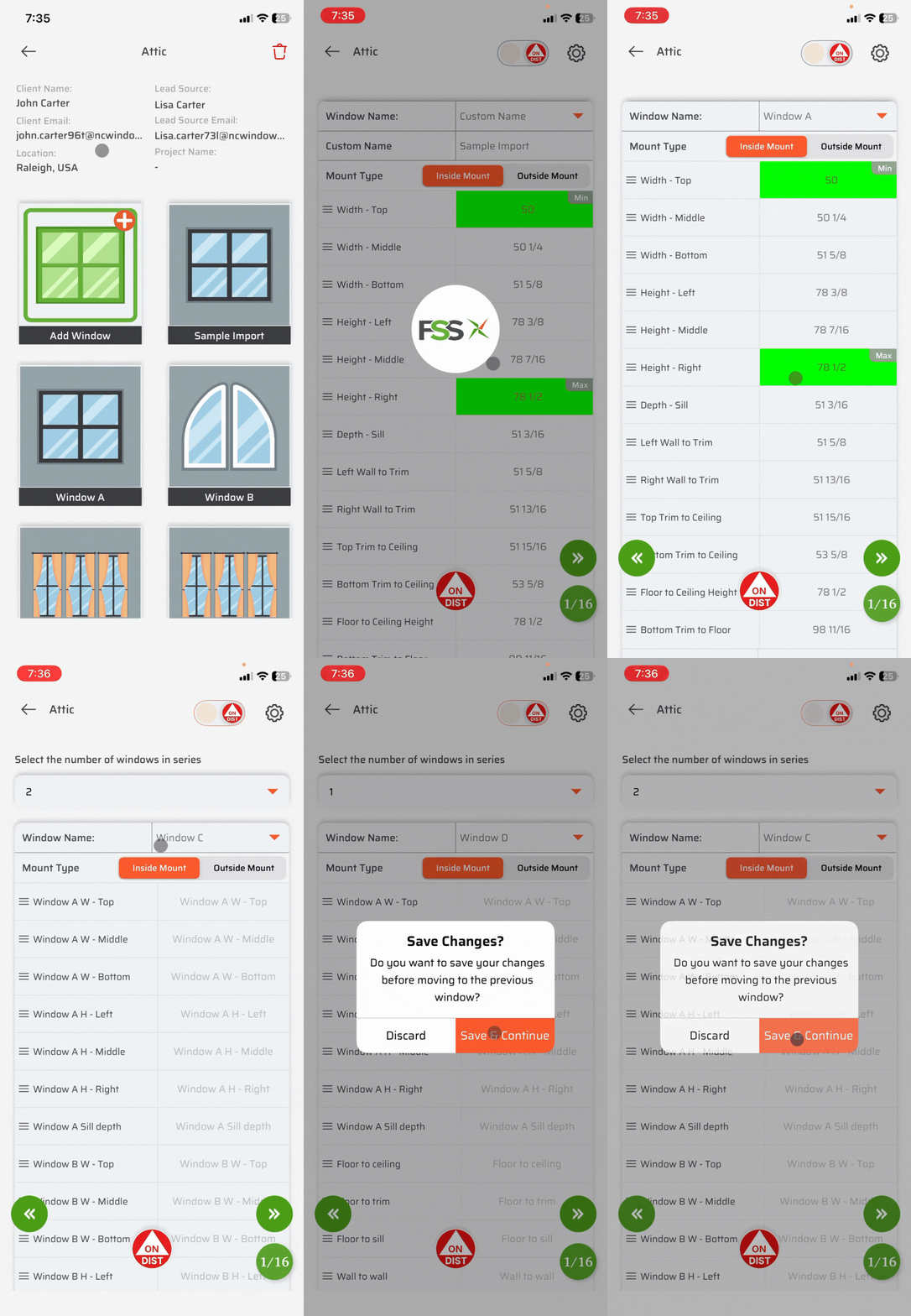
One-Tap Window Switching & Preview
We’ve also streamlined how you move between windows and previews to keep you in flow while measuring.
What Changed?
Previously, switching between windows or previewing measurements required multiple steps and navigation back and forth.
What’s New?
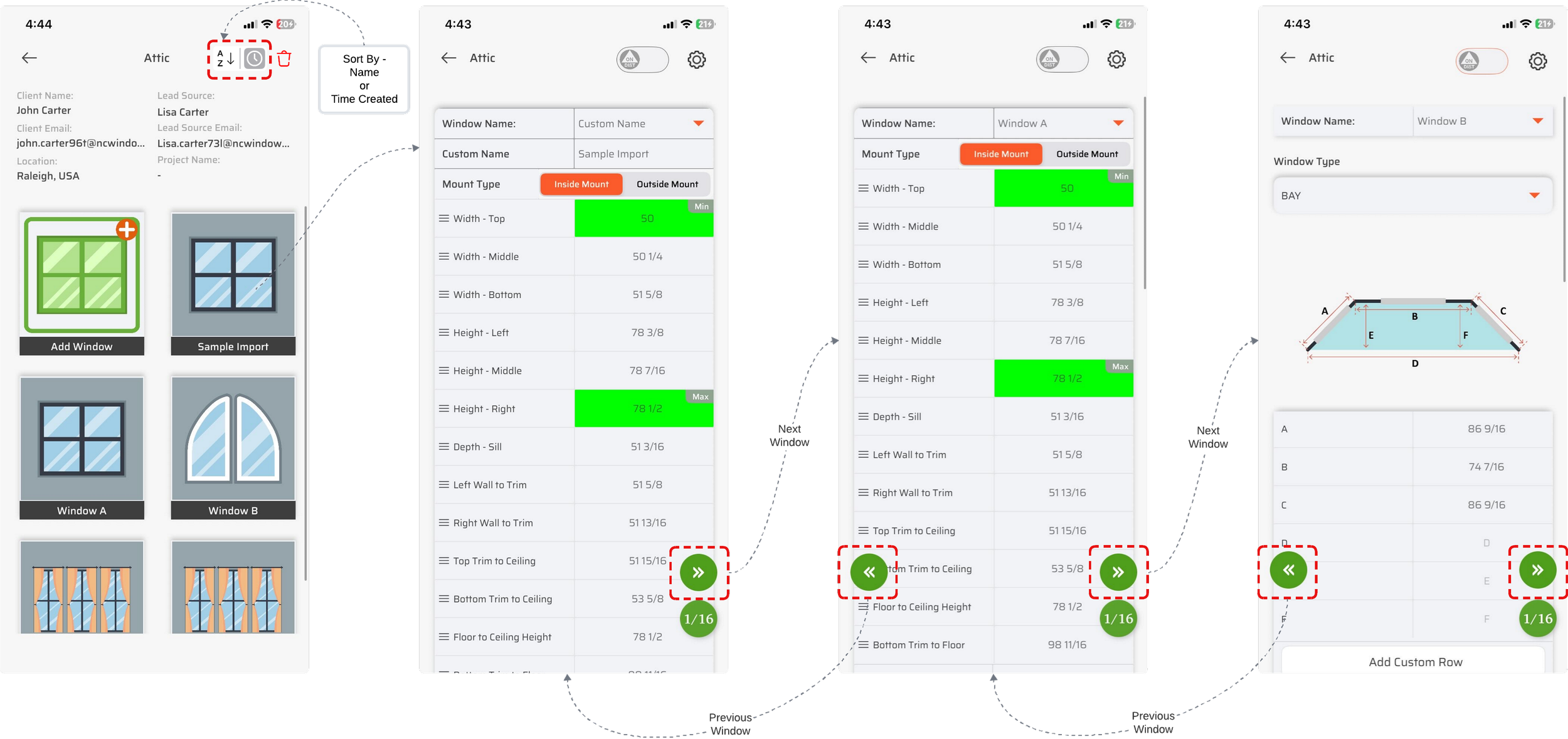
Single-tap navigation to move forward or backward
Quickly switch between windows or preview screens
Navigation buttons are always accessible
Sort windows alphabetically or by creation time. Navigation (forward/backward) will always follow the creation order.
Why This Matters
Faster capture across multiple windows
No interruption to your measurement rhythm
Less repetitive tapping and backtracking
This is especially helpful when measuring multiple windows in the same room or handling large projects.
⌨️ Change 4:
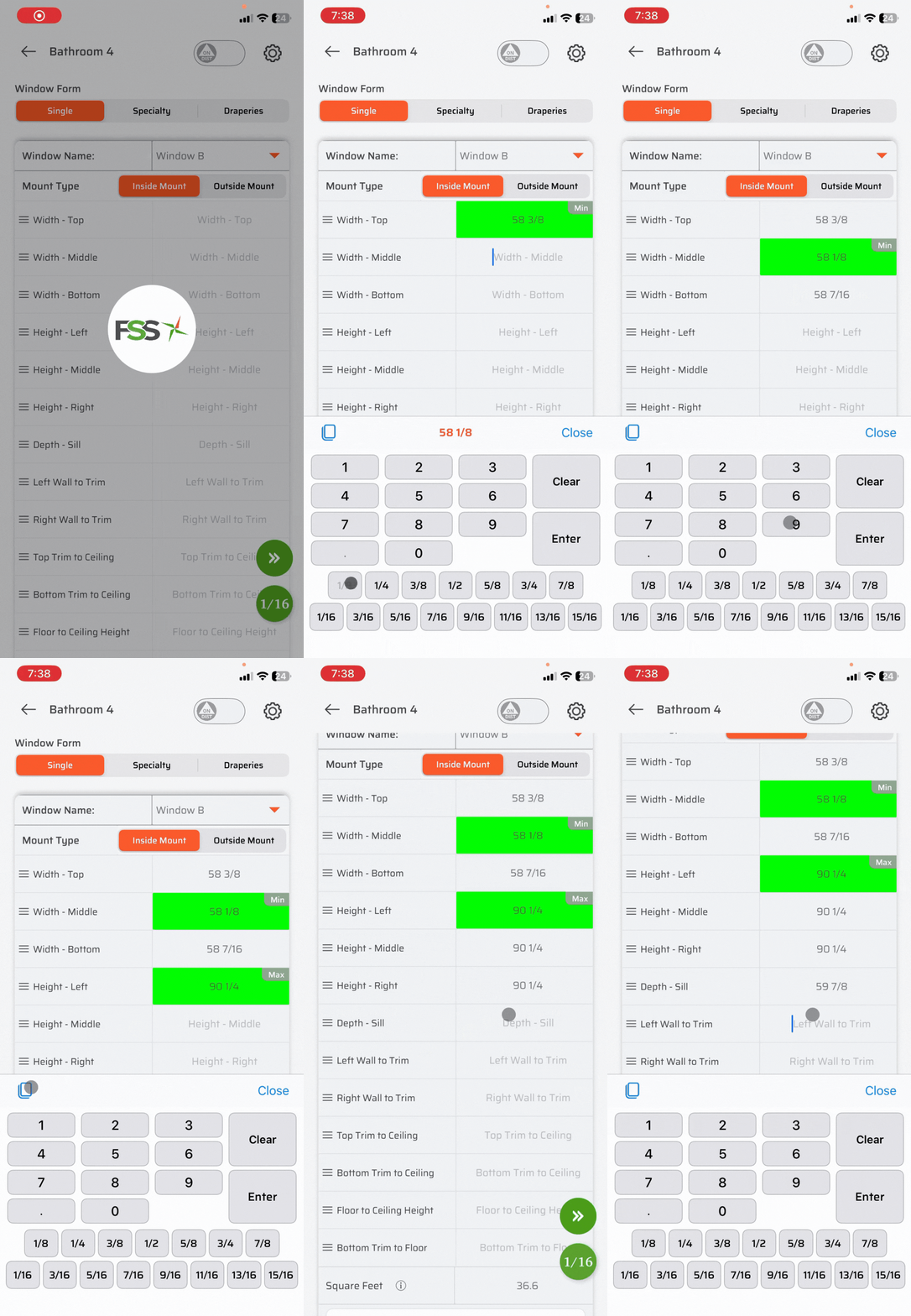
Faster, Smarter & More User-Friendly Keypad
We heard your feedback loud and clear:
the fraction wheel slowed things down, especially for larger measurements.
So we redesigned the keypad from scratch.
A Brand-New Measurement Keypad
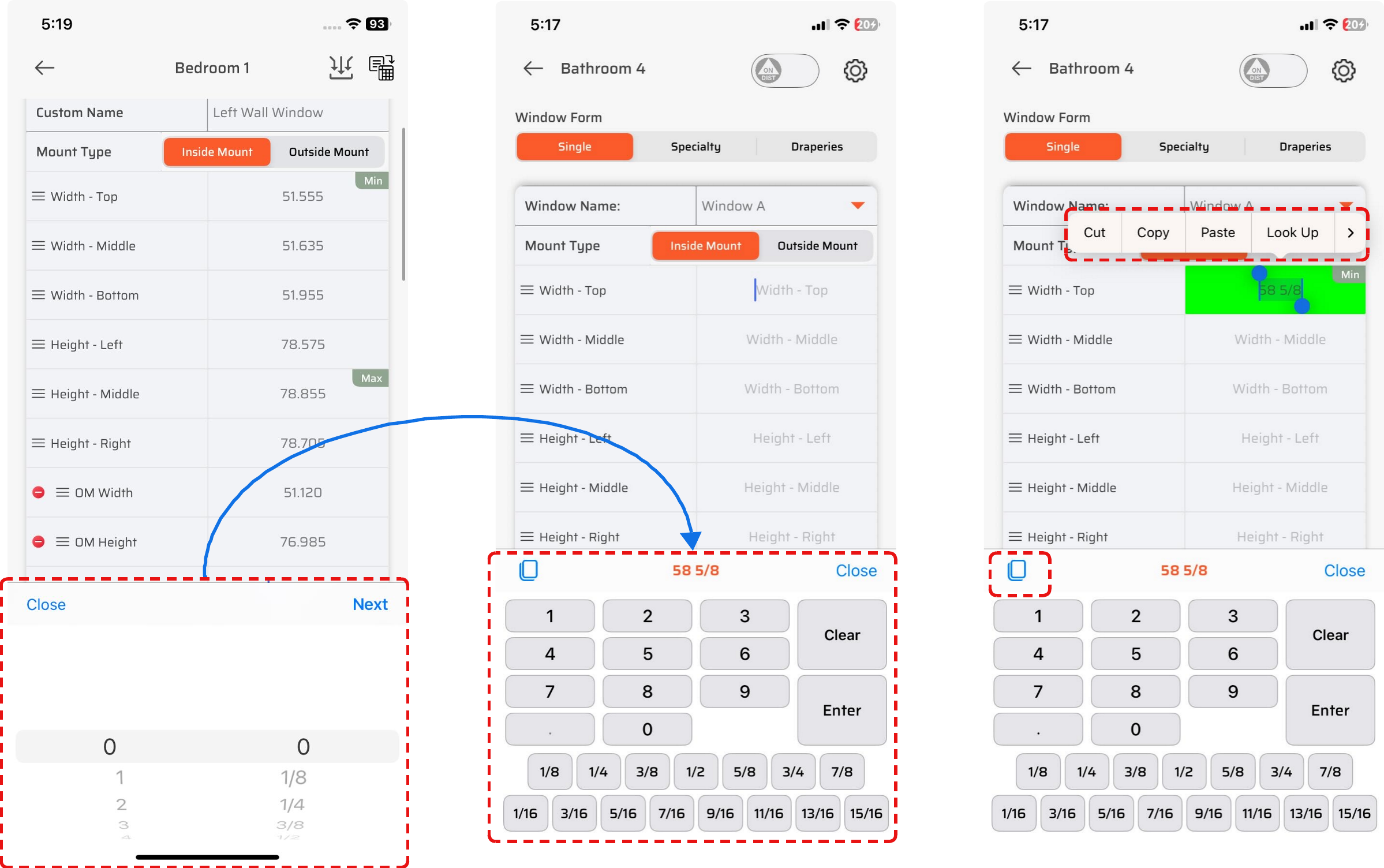
The new keypad is designed to match how you actually read and enter measurements in the real world.
What’s New?
Dedicated 1/8 and 1/16 fraction buttons
Fractions laid out in natural increment order, just like a tape measure
No scrolling or spinning wheels
Faster entry for large and complex measurements
This makes entering values quicker, clearer, and more intuitive from the first use.
✂️ Copy, Cut & Paste Measurements (New!)
You can now:
Copy an existing measurement
Cut a value
Paste it into any other measurement field
Perfect for:
Repeating values across similar windows
Avoiding retyping
Speeding up large jobs
📘 Change 5:
In-App Instructions & Interactive App Walkthrough
We’ve introduced in-app instructions to help users learn every feature of the app—right when and where they need it.
This feature is designed to ensure new and existing users fully understand the app flow without confusion.
Learn directly on the screen they are working on and void switching between help docs or videos. Everything is explained inside the app, in real time.
Two Ways to Access In-App Instructions
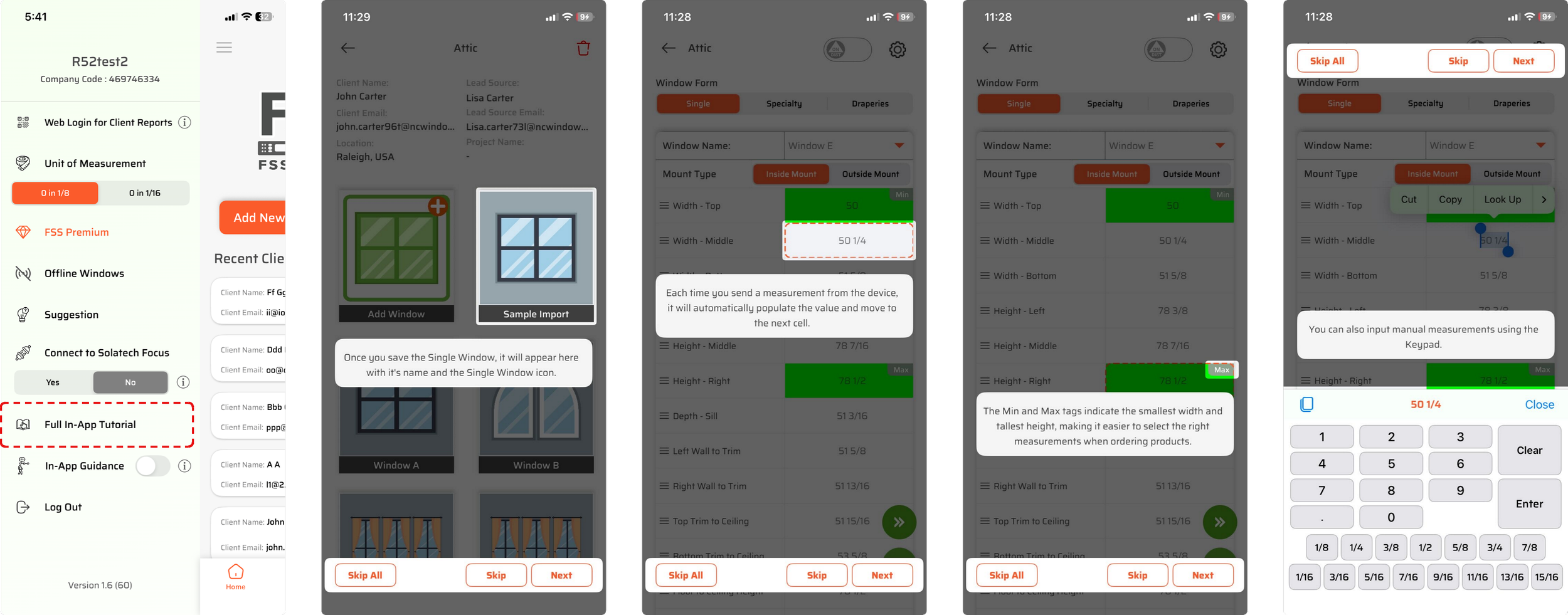
1️⃣ Automatic Walkthrough After Signup (Recommended)
Right after signup, users are automatically guided through an interactive app walkthrough.
How it works:
The app introduces key features step by step
Users can exit the walkthrough at any time
We recommend staying in this flow to understand the app workflow clearly and quickly
This is the fastest way for new users to get comfortable with the app.
2️⃣ User-Controlled Instructions (On-Demand Help)
Users can also access instructions anytime using the instruction toggle from the left menu.
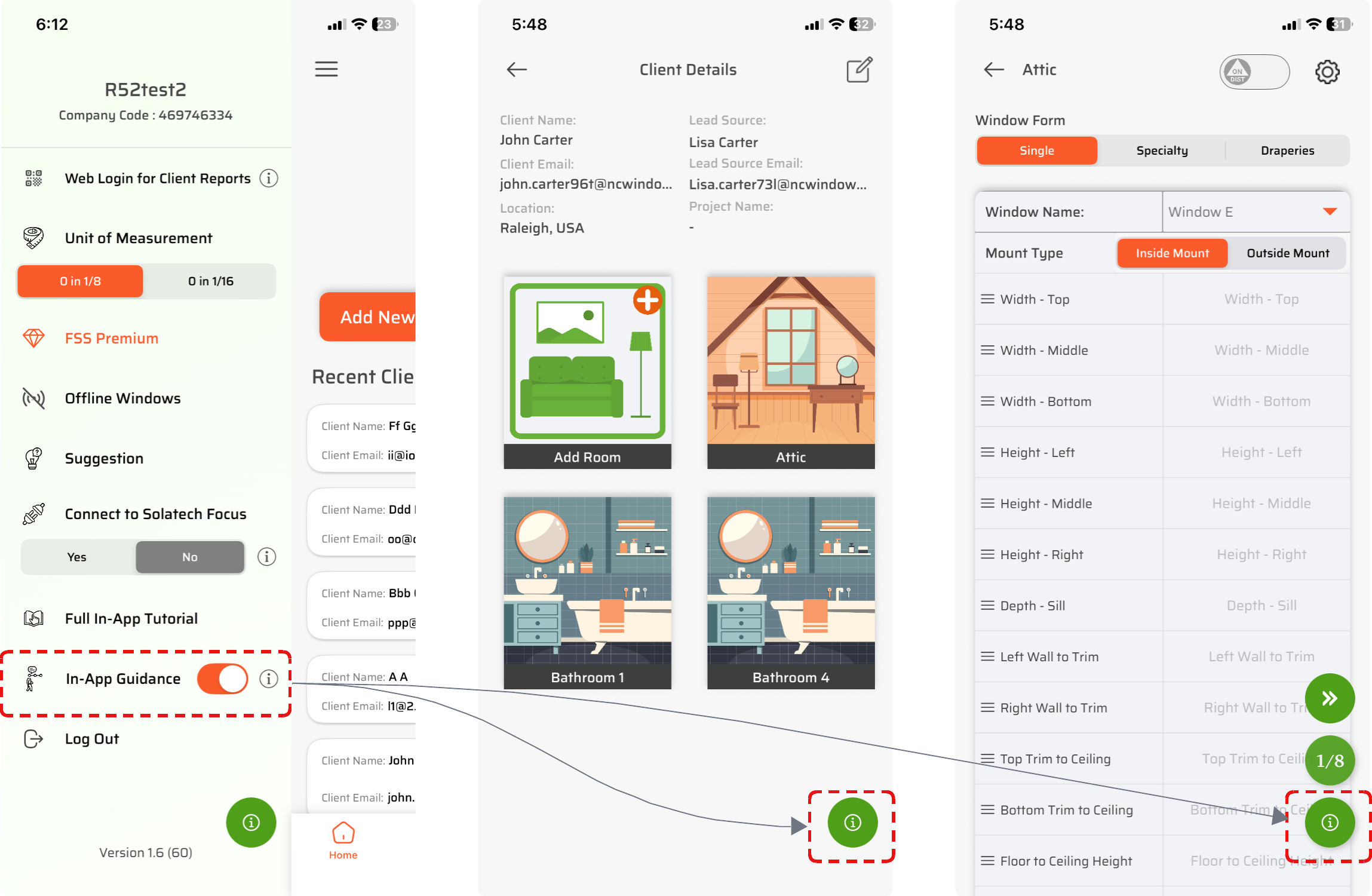
Once enabled:
A green floating info button appears on all screens
Tapping the info button shows instructions only for the current screen
Instructions do not navigate you away from your current screen
If you move to another screen, instructions will not appear again unless you tap the info button
This gives users full control over when and where they want help.
Each instruction flow includes simple controls:
Skip All – Exit the entire instruction flow
Skip – Skip instructions for the current screen only
Next – Move to the next instruction step
This ensures instructions are helpful—not intrusive.
Final Thoughts
Every feature in this update was built from real feedback from professionals in the field. If you measure windows daily, this release is designed to make your job easier, faster, and safer.
👉 Update your iPhone and iPad app today by downloading the latest version of the FSS Window Pro® from your app store and experience the difference.